/// the unofficial documentation
Big tech ships website builders. Nobody documents them. We do.
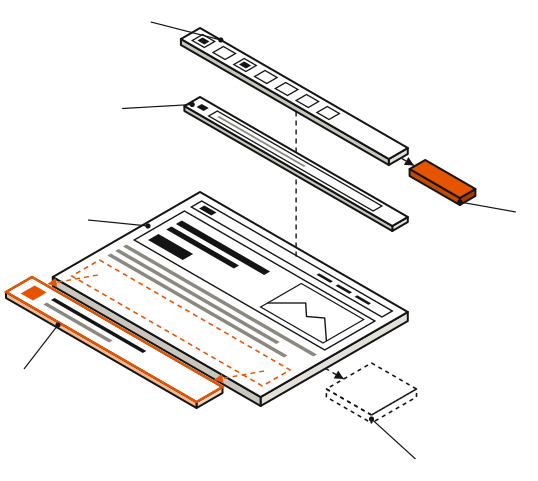
Google Sites, Square Online, Canva Websites, Adobe Express, Microsoft Power Pages: five real products, zero product marketing. SideDoorSites reads the docs so you don't have to.
- Toolbar. The tools a launch demo would show off, if side products got launch demos.
- Address bar. Whose domain the page lives on: yours, or a subdomain of the parent company.
- Canvas. The page itself, and the counts a free tier rations: sections per page, sites per account.
- Section block. One unit of a page. Some free tiers let you design more of them than they will publish.
- Publish button. Where the price turns up — as a plan, or as a toll like Square's 3.3% per online sale.
- Exit. Drawn dashed: the part to check is in the box. business.site's addresses went dark on June 10, 2024.
| Product | Parent | Free? | Score /10 |
|---|---|---|---|
| Square Online | Block, Inc. | YES — real store | 8.1 |
| Google Sites | YES — entirely | 7.8 | |
| Canva Websites | Canva | PARTIAL | 7.0 |
| Adobe Express | Adobe | PARTIAL | 6.4 |
| Power Pages | Microsoft | TRIAL | 6.0 |
Latest dossiers
view all →The big-tech website builders — Google Sites, Square Online, Canva Websites, Adobe Express, and Microsoft Power Pages — are maintained by some of the most valuable companies in history and reviewed by approximately no one. This site exists to correct the second half of that sentence.
Why nobody reviews them
The review industry runs on affiliate commissions, and side products mostly don't pay any. Google Sites has no price, no affiliate program, and therefore no coverage beyond forum threads. Power Pages has a price — several, in fact — but no commission, so no reviewers outside Microsoft consultancies bother. Where there's no payout, there's no content farm churning out comparison posts. That is a kind of purity, and also a kind of silence.
There are no launch events to react to either. Google Sites logged two feature announcements in all of 2025 and, at the time of checking, none in 2026. Adobe's webpage feature descends from a 2016 product that Adobe has renamed several times and marketed roughly once. These vendors run documentation cultures built for their flagship products; the side doors get a help article and a shrug. The limits that actually matter are scattered, partial, or simply unpublished.
What this site does
We treat the side products like real products, because they are. Each one gets a dossier built from the vendor's own documentation, pricing pages and help centers, read the way a lawyer reads a contract — with particular attention to what isn't there. The register tracks all five at a glance. The changelog records when something changes, which the evidence suggests will not strain anyone's inbox.
For the avoidance of doubt: we are not affiliated with Google, Block, Canva, Adobe, or Microsoft. Their names appear here to identify their products, which is what names are for. The full stance is on the about page.
The field, August 2026
Square Online leads the register at 8.1 — the only entry that functions as a complete business tool, with a genuinely free store wired into Square's payment system. Google Sites holds 7.8: free without qualification and limited without apology. Canva Websites takes 7.0 for producing handsome one-pagers inside a tool many people already pay for. Adobe Express sits at 6.4, publishing web pages as a side effect of a graphics app. Microsoft Power Pages anchors the table at 6.0 — an enterprise data portal that answers a question no small business asked. The rankings, pricing and catches are consolidated in the big-tech website builders comparison.
A note on precedent
Google previously operated a free builder called business.site, auto-generated from Business Profiles and used by millions of small businesses as their only web presence; it was switched off in March 2024, and by June 10, 2024 every URL on it returned a page-not-found. The full account is in what happened to business.site, and it is the reason this site reads exit paths as closely as feature lists.
When a side product stops being enough — and each has a documented moment where it does — the routes out are cataloged in when you've outgrown them. Until then: the docs, as written, minus the wishful thinking.
Frequently asked questions
Q.01Are big-tech website builders like Google, Square and Canva any good?
Some are genuinely useful for the right job, but they're side products, not flagship tools, and the documentation shows it. We review each on its own merits and flag where being a side project bites you.
Q.02Is Canva a real website builder?
Canva can publish a simple one-page site from its design tool, which is fine for a link page or a basic landing page. It is not built for a multi-page site with real structure — we mark exactly where it stops.
Q.03Is Square Online good for a store?
Square Online is a reasonable fit if you already use Square for payments in person, tying online and offline sales together. Watch the transaction rate on its free tier — it rose to 3.3% per online sale in January 2026.
Q.04Are big-tech website builders free?
Several have free tiers because the website is a hook for the company's main product — payments, design, ads. That can be a genuine bargain or a funnel; we say which for each one.
Q.05What's the catch with a big-tech side-product builder?
The risk is neglect: side products get less investment and can be discontinued, and their help docs are often thin. We document what each one actually does so you're not the one writing the missing manual.