Google Sites Custom Domain (2026): Setup, the www-Only Rule, and What It Really Costs
Connecting a custom domain to Google Sites is free: Google charges nothing to map a domain you own to a published site, so the only bill is your registrar's. Two things trip people up. Google maps a subdomain such as www, never the bare domain, so example.com has to be forwarded to www.example.com at your registrar. And Google no longer sells domains on their own; buying one "from Google" now happens inside a paid Google Workspace sign-up.
This guide is for anyone with a Google Site and a domain, or about to buy one. If your site sits in a work or school account, Google's help says to contact your administrator instead, because the admin console handles it. Every rule below comes from Google's help pages, read on 10 October 2026.
The short answer: connecting is free; the domain isn't
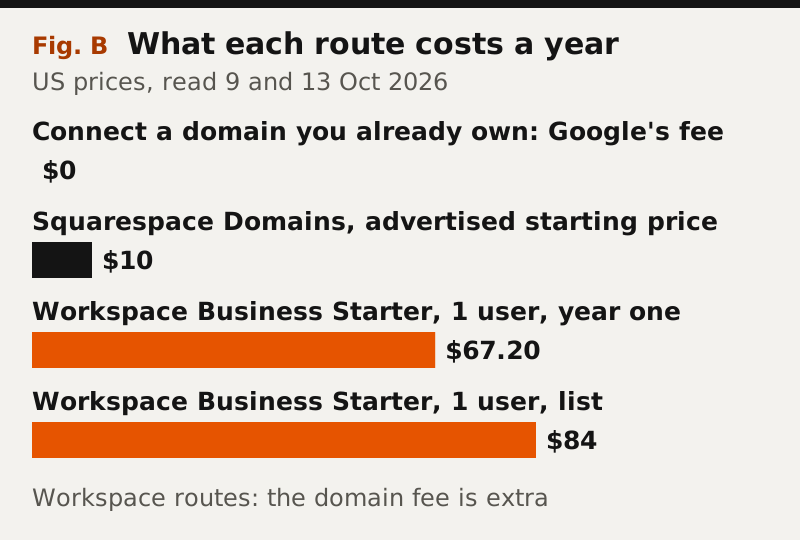
There are three routes to a custom address, and only one is cheap. Connecting a domain you bought anywhere costs $0 from Google. Squarespace Domains, which took over Google Domains' customers, advertises domains from $10. Buying through Google means signing up for Workspace, where Business Starter costs $7 per user per month at list with a one-year commitment, $84 a year, or $5.60 a month for the first 12 months on Google's introductory offer as of 13 October 2026, which comes to $67.20 for year one; Google's FAQ says the domain is an additional fee on top.
For a club, a class or a small business that only wants an address, Workspace is the expensive way to get one. It makes sense only if you also want the business email and shared drives that come with it.
Before you start: own the domain, own the site, publish to the world
Three conditions have to be true before the setup screen will cooperate. You need control of the domain's DNS at your registrar. You need to be the site's owner, because Google states that "only the owner of a site can connect it to a domain"; an editor cannot. And the site has to be published to everyone, because a custom domain pointed at a site restricted to your organisation sends visitors back to the sites.google.com address.
If you are not sure who owns the site, check the sharing settings first. Transferring ownership later can break the mapping, so it is cheaper to sort ownership out now than to redo the DNS after a handover.
Step by step: Settings, Custom domains, verify, CNAME
In the Sites editor, go to Settings, click Custom domains, then Start setup, and enter your domain with its subdomain, for example www.example.com. If Google asks you to verify ownership, it sends you to Google Search Console: add a Domain property (not a URL prefix), choose the instructions for "Any DNS Provider", copy the TXT record Search Console gives you into your DNS, and click Verify. Then return to Sites and run the setup again.
Once verified, click Next and follow the on-screen instructions for your registrar. For a Google Site the record Google's admin documentation lists is a CNAME: host www, value ghs.googlehosted.com. Click Done and wait. Google says changes can take up to 48 hours to become visible, though they usually arrive sooner.
The www-only rule and forwarding the bare domain
Google Sites maps a subdomain, not the bare domain. Its error list makes the rule explicit: "Your URL must include a subdomain, like 'www'." A CNAME record cannot sit on the bare example.com in standard DNS, which is why the address visitors type without www needs separate handling.
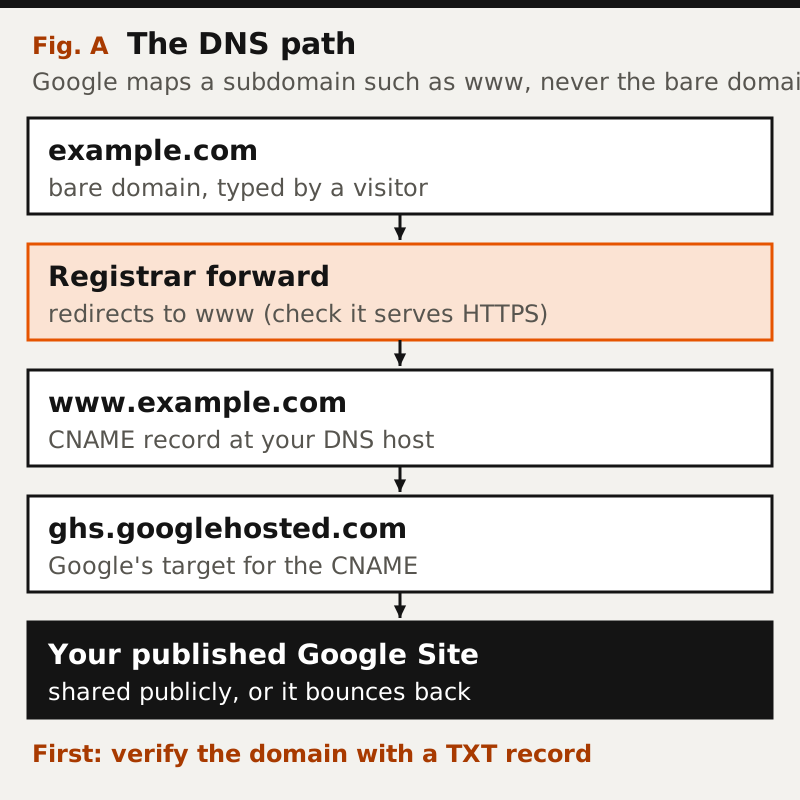
With a personal Google account, the fix is a forward at your registrar: point example.com to https://www.example.com using the registrar's URL-forwarding or redirect feature. Check that the forward itself works over HTTPS, because some registrars forward only plain HTTP, and a browser that tries https://example.com first will show an error instead of your site.
Workspace administrators get a second option. Google's admin help describes a naked-domain redirect set up in the Admin console under Domains, followed by A records at the domain host pointing at Google's servers. The same page warns that the console supports only HTTP for this redirect, so a domain using HTTP Strict Transport Security, which forces HTTPS, cannot be redirected this way. Google suggests checking a domain's status at hstspreload.org; if it is listed there, use a registrar forward instead.
Buying a domain through Google: the Workspace route
Google sold its Google Domains registrations to Squarespace: the agreement was signed on 15 June 2023 and the transaction closed on 7 September 2023, after which Google Domains customers became Squarespace customers. Google itself now sells domains as part of Workspace sign-up. Its Workspace FAQ says that if you do not own a domain "you can purchase it from Google for an additional fee", and that Google helps you buy it "through one of our domain host partners".
So "buy a domain in Google Sites" means: start a Workspace subscription, buy the domain in that flow, then connect it to your site. Workspace pricing on 13 October 2026 put Business Starter at $7 per user per month at list with a one-year commitment, with an introductory $5.60 for the first 12 months and the first 20 users. If you do not need Gmail on your domain, a registrar is cheaper.
Former Google Domains users: what moved to Squarespace
If your domain was registered with Google Domains, it now sits in a Squarespace account, and older tutorials that tell you to open Google Domains' DNS screen are out of date. The DNS steps are the same in principle: add the TXT record for verification and the www CNAME to ghs.googlehosted.com, this time in Squarespace's DNS settings, and any forward you had for the bare domain is now managed in that account.
Affiliate link. We may earn a commission — it never moves a ranking.
Troubleshooting: Google's error messages decoded
Google's help lists eight errors you can hit during setup. The table restates each one with what it means and the fix Google gives.
| Error message | What it means | Fix |
|---|---|---|
| Invalid DNS | Google cannot see the CNAME record | Add the CNAME; if already added, wait 24 to 48 hours and retry |
| The URL check failed | The address did not validate | Type the custom URL again and click Assign |
| This isn't a valid URL | Typo, or no subdomain | Enter the full address, including a subdomain such as www |
| Already in use by another Google service | Mapped to Blogger, another Site or App Engine | Delete the existing mapping first |
| Already in use by this site | The mapping already exists | Nothing to do |
| This URL is missing its certificate | Google has no certificate for the address | Delete the custom URL and assign it again |
| This URL is not verified | Ownership not proven | Verify the domain in Search Console with the TXT record |
| Maximum number of URLs for this domain | The weekly mapping limit was hit | Wait: the limit is 20 mappings per week |
Limits and edge cases: 5 domains, 20 mappings a week, no export
You can connect up to five custom domains to one site, which covers a .com, a country domain and a couple of misspellings. Google caps new mappings at 20 per week. Google warns the domain may stop working if you delete the site, transfer the site's ownership to someone else, or move the site into a shared drive, so plan handovers around the DNS.
The deeper limit is the platform's. A Google Site cannot be exported, so a custom domain makes a Sites page look permanent without making it portable. Keep the domain registered in your own name at a registrar you control; if you ever leave Google Sites, you keep the address and point it somewhere new. Our Google Sites review covers the rest of what Sites does and does not do.
When Google Sites isn't enough
A custom domain fixes the address, not the ceiling. If you need a store, a blog with categories or design control, a general builder includes domain handling inside the product: Wix and Squarespace bundle a first-year domain with annual plans, and Hostinger does the same at a lower monthly price on a long prepay. Our big-tech website builders register ranks the side-door options, and when you've outgrown them maps the move.
Frequently asked questions
Q.01Is a Google Sites custom domain free?
Connecting one is. Google charges nothing to map a domain you own to a published site, so you pay only your registrar. Buying a domain through Google requires a Google Workspace subscription, and the domain is billed on top.
Q.02How do I connect a custom domain to Google Sites?
As the site's owner, open Settings, then Custom domains, then Start setup, and enter the address with www. Verify the domain in Google Search Console with a TXT record if asked, add a CNAME for www pointing to ghs.googlehosted.com at your DNS host, and allow up to 48 hours.
Q.03Why can't I use my domain without www on Google Sites?
Google Sites maps only a subdomain such as www; its error text says the URL must include one. Forward the bare domain to the www address at your registrar, and check that the forward works over HTTPS.
Q.04Can I buy a domain directly from Google Sites?
Not on its own. Google sold Google Domains to Squarespace in 2023, and Google now sells domains as part of a Google Workspace sign-up, for an additional fee on top of a Workspace plan. A registrar is the cheaper route if you do not need Workspace.
Q.05How many custom domains can a Google Site have?
Up to five per site, according to Google's help, with a limit of 20 domain mappings per week. The domain may stop working if the site is deleted, its ownership is transferred or it is moved into a shared drive.
Position in the field: the big-tech website builders register. Outgrowing these products entirely is covered in when you’ve outgrown them.