How to Make a Wedding Website with Canva (2026): Steps, RSVPs, Privacy and Where It Stops
Yes, you can make a wedding website with Canva, and you can publish it on the free plan. Canva Free puts it on a free .canva.site address, with a "Designed with Canva" footer you cannot remove, and it publishes at most 10 sections per page even though the editor lets you design 20. Canva Pro, US$144 a year on Canva's US pricing page read 9 October 2026, removes the footer, publishes up to 20 sections a page and lets you connect a domain you already own. RSVPs work through a Canva form whose replies collect in Canva Sheets.
Canva suits couples who already designed invitations there and want the site to match them. If you need RSVP tracking with plus-ones, a registry and guest messaging in one dashboard, a dedicated wedding-website service will do more for less effort. Every rule below comes from Canva's help centre and product pages, read on 10 October 2026.
| What a wedding site needs | Canva Free | Canva Pro |
|---|---|---|
| Publish the site | Yes, up to 5 live websites | Yes, unlimited websites |
| Web address | Free .canva.site address, or a domain bought through Canva | Free address, a bought domain, or a domain you already own |
| Canva branding | "Designed with Canva" footer, cannot be removed | No footer |
| Sections per page | Design 20, publish 10 | Design and publish 20 |
| Pages per site | Up to 45 | Up to 45 |
| RSVP form | Canva form, replies in Canva Sheets | Same, plus response insights |
| Password and search hiding | In the publish settings | In the publish settings |
| Price | $0 | US$144 a year |
Steps 1 to 3: template, sections, pages
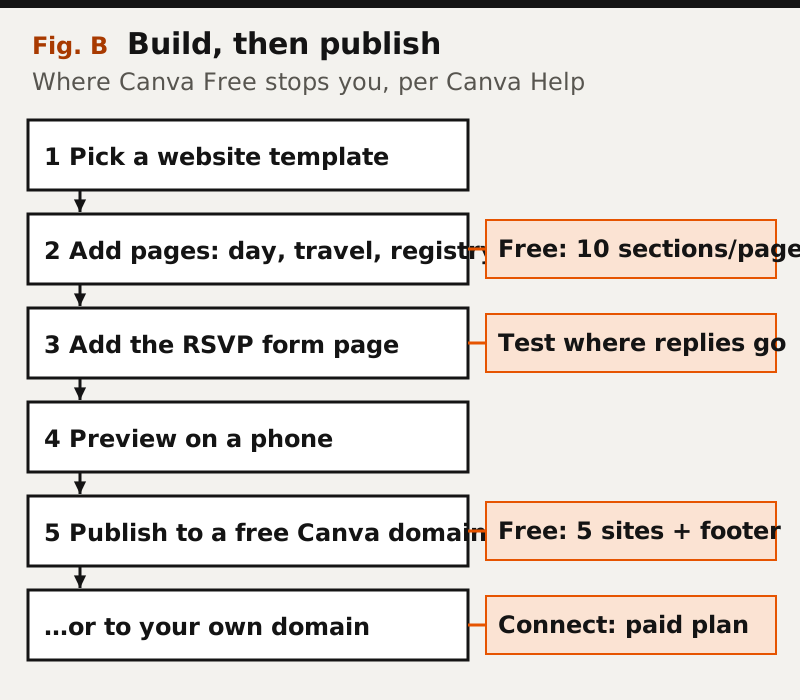
Start from a Website template, not a poster or a mobile "link in bio" design. Canva's help is explicit that mobile website and Link in Bio designs publish only to a canva.link address and cannot use a free .canva.site name or any custom domain, so a wedding site begun in the wrong format has to be resized before it can go on your own address. Search Canva's templates for "wedding website", pick one, and replace the names, date and photos.
Next, decide what goes on which page. A wedding site usually wants the story, the day's schedule, travel and accommodation, the dress code, a registry link, a photo section and the RSVP. Canva supports multi-page websites of up to 45 pages, and its wedding page suggests adding pages for the dress code, event logistics, a venue map, a gift registry and an online RSVP form.
The limit that bites is per page, not per site. Canva's help says Free users "can design with up to 20 sections per page, but can only publish a website with up to 10 sections per page", and anyone who exceeds it is prompted to cut sections or upgrade at the publish step. A single long scrolling wedding page reaches 14 sections quickly.
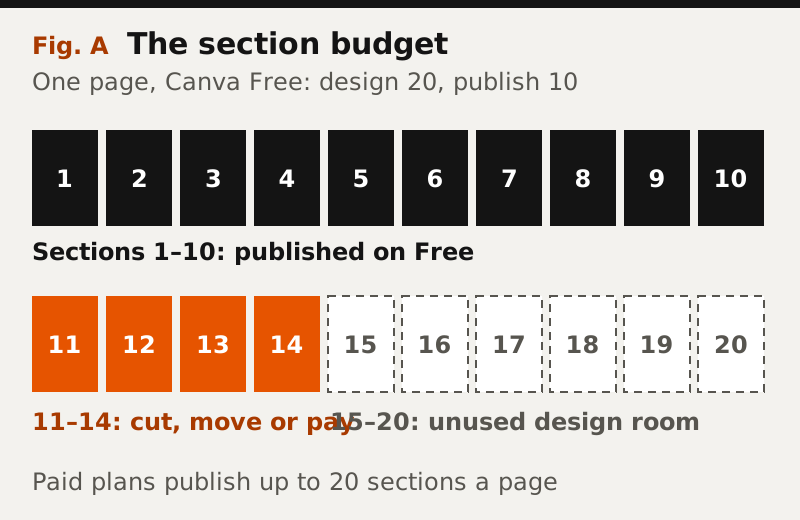
The free fix is structural: split the long page into several shorter ones. Fourteen sections become a seven-section home page and a seven-section "the day" page, both under the cap, and the navigation menu Canva builds from your page titles links them together.
RSVPs: Canva Forms, Google Forms or a wedding platform
Canva's own forms are the simplest RSVP route. Its forms page says you can embed a form on any Canva website, collect responses "straight to Canva Sheets", export them as a CSV, and set a form to accept only one entry per user; it names RSVPs as a use case. Response insights such as respondent counts and timestamps are listed as a Pro or Teams feature, but the replies themselves are visible in the form's Responses tab.
What a Canva form will not do is behave like a guest list. It records answers; it does not know who was invited, chase the people who have not replied or cap a party at the plus-ones you offered. For 40 guests that is fine. For 200, a spreadsheet you maintain alongside it, or a wedding service with a real guest list, saves hours. Test whichever form you use from a phone before the invitations go out, and confirm the replies arrive where you expect.
Affiliate link. We may earn a commission — it never moves a ranking.
Privacy: password protection and search hiding
Wedding sites carry addresses, dates and sometimes a hotel block, so privacy matters more than on most pages. Canva's website settings list two controls: "Search engine visibility", which you turn off to hide the site from Google and other search engines, and "Password protection", which requires visitors to enter a password. Canva's own wedding page suggests a password-protected site for anything you want to keep private.
Canva's help does not mark either setting as paid-only, but check the publish panel on your own account before you rely on it. Hiding a site from search engines asks them not to list it; it does not stop someone with the link from opening it. Put the password on the invitation or the save-the-date, not on the site itself.
Publishing: a free Canva address or your own domain
When you click Publish website, Canva offers three kinds of address. The free one is a .canva.site name, and Free accounts can keep up to five live websites on it. A domain bought through Canva works on any plan, renews automatically each year, includes WHOIS protection, and has to be verified from an email within 16 days or it is suspended; Canva resells domains from Tucows and prices them by extension, so check the price at checkout. Connecting a domain you already own needs Canva Pro, Teams, Business or Education; the first three can connect up to five existing domains at a time, Education accounts one.
For most couples the free address is enough, because guests arrive by link or QR code, not by typing. A memorable domain is worth it if older relatives will type the address from a printed card. If you want your own name without paying for Pro, buying the domain through Canva is the route that works on the free plan; Canva Pro is the route if you already own the domain or want the footer gone.
Affiliate link. We may earn a commission — it never moves a ranking.
Music, maps, schedules and registries
Maps, schedules and registry links are straightforward. A schedule is a text section, a map can be an image or an embed, and a registry is a button linking to the store. Canva's website help lists text, photos, videos, graphics, charts and embeds as things you can add to a page.
Music is the question we cannot answer cleanly. Canva's website help pages list videos and embeds but say nothing about an audio track on a published site, so we will not promise background music. The options that fit what Canva documents are a video element with sound or an embed from a service you use; test either in Canva's preview and on a phone, where browsers commonly block sound that plays automatically.
Canva vs a dedicated wedding website
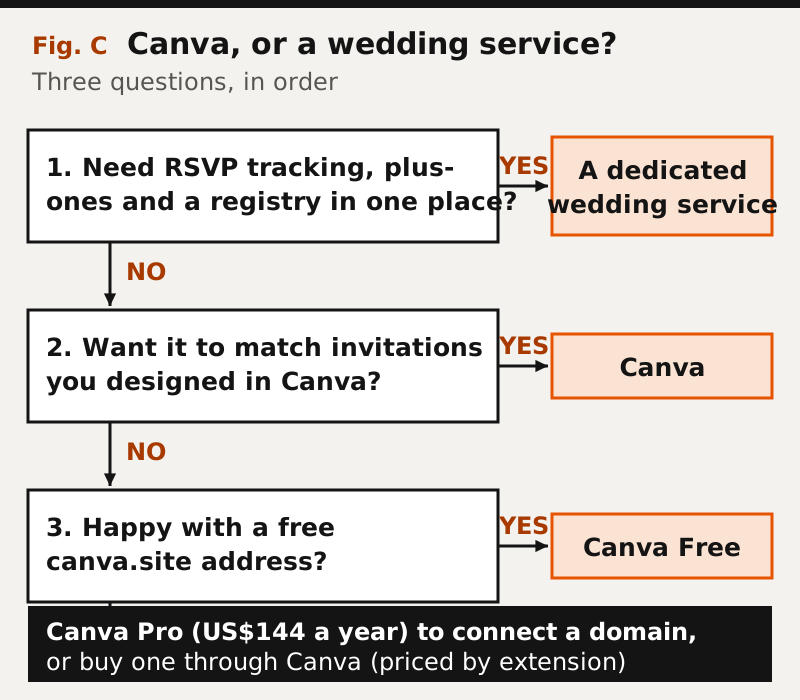
The decision comes down to three questions, asked in order. Do you need RSVP tracking with plus-ones and a registry in one place? Then a dedicated wedding-website service is built for it. Do you want the site to match invitations you designed in Canva? Then Canva wins on design consistency. Is a free .canva.site address acceptable? Then Canva Free is enough; if not, buy a domain through Canva or step up to Pro.
Couples who want a polished multi-page site with a blog-style story and room to grow can look at a general builder. Squarespace starts at $19 a month on annual billing (US, read 9 October 2026) with a 14-day trial and no free plan, which is more than a wedding needs unless design matters a great deal. Our Canva vs Squarespace comparison covers that trade in depth, and the Canva websites review documents the builder as a whole.
Affiliate link. We may earn a commission — it never moves a ranking.
Edge cases before you send the link
Turn on "Resize on mobile" in the publish settings, because most guests will open the site on a phone, then check every page in Canva's mobile preview. Free .canva.site names that another account used before cannot be reused, so pick an address specific to you. If you buy a domain, set a reminder for its renewal date, because Canva renews it automatically each year until you cancel. And when the wedding is over, decide whether to keep the site as a keepsake or unpublish it; on Free, it still counts toward your five live websites.
Frequently asked questions
Q.01Is a Canva wedding website free?
Yes. Canva Free can publish a wedding website on a free .canva.site address, with up to five live websites, a Designed with Canva footer and a limit of 10 published sections per page. Canva Pro, US$144 a year on Canva's US pricing page (read 9 Oct 2026), removes the footer and publishes up to 20 sections a page.
Q.02Can guests RSVP on a Canva wedding website?
Yes. Add a Canva form to the site, and replies collect in Canva Sheets, where you can view or export them as a CSV. You can set the form to accept one entry per user, but it does not track an invitation list or plus-ones the way a wedding service does.
Q.03Can I add music to a Canva website?
Canva's website help lists videos and embeds, not a background audio track. A video with sound or an embedded player from a music service are the options that fit what Canva documents; test them on a phone, where browsers often block sound that starts by itself.
Q.04Can I use my own domain for a Canva wedding website?
Yes. Connecting a domain you already own needs Canva Pro, Teams, Business or Education. Any plan can buy a domain through Canva, which renews yearly and must be verified from an email within 16 days of purchase.
Q.05How do I make my Canva wedding website private?
In the publish settings, turn on password protection and turn off search engine visibility. The password keeps the site closed to anyone without it; search hiding only asks search engines not to list the site.
Position in the field: the big-tech website builders register. Outgrowing these products entirely is covered in when you’ve outgrown them.