Canva vs Squarespace (2026): A One-Pager Tool vs a Real Website Platform
Canva vs Squarespace is a category error that people keep needing answered anyway. Canva is a design tool that will publish your design as a live webpage — free, five times over. Squarespace is a website platform: pages, navigation, a blog engine, a store, and a subscription to pay for all of it. One produces a very good-looking page; the other produces a website. The distinction sounds pedantic until you need a second page.
Method note: Canva figures below are from our fact base against Canva's own help pages. Squarespace is described by capability rather than price — its plan figures shift with billing cycles and promotions, and we do not print numbers we would need to babysit. Canva's position among its peers is on file in our register of big-tech website builders; Squarespace sits outside that register, being a website company's main product rather than anyone's side project.
What a Canva website actually is
A Canva website is a published Canva design. That single sentence explains every capability and every limit. On the free plan you can publish up to 5 websites on the free my.canva.site domain, each carrying a mandatory "Designed with Canva" footer that cannot be removed without upgrading. Multi-page support now stretches to 45 pages, but the built-in navigation menu is anchor-link based — it jumps between sections of a page. The one-pager DNA shows through the paint.
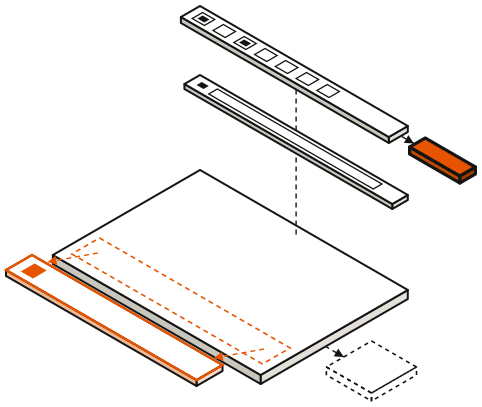
The catalogue of absences is short to write and long to live with: no ecommerce, no blog engine, no native forms, minimal SEO controls. And one limit is placed with actuarial precision: free users can design up to 20 sections per page but publish only 10. Canva will happily let you build a page twice as long as it will publish, then present the choice — delete half your site, or pay — at the moment you are most committed. Paid plans publish the full 20.
Each slab is one section. Solid: published. Dashed: designed in the editor, held back on the free plan.
Affiliate link. We may earn a commission — it never moves a ranking.
What Squarespace actually is
Squarespace is website architecture sold as a service: true multi-page structure with real navigation, professionally designed templates, a built-in blogging engine with the unglamorous machinery blogs need, commerce with products, checkout and inventory, and SEO controls covering metadata, redirects and sitemaps. Custom domains are a standard part of the arrangement rather than an upsell surprise.
There is no free tier — a trial, then a subscription. That is the honest shape of the product: Squarespace charges money because it is the whole company, not a feature being kept alive beside a design tool. You are not the marketing funnel for something else; you are the customer.
Affiliate link. We may earn a commission — it never moves a ranking.
When Canva's free tier is genuinely enough
There is a real class of project for which Canva free is not a compromise but the correct specification: an event page, a wedding site, a launch announcement, a portfolio teaser, a one-page presence for a side project that may not survive the quarter. These are one-page problems, ten sections is plenty, and the design tooling — the actual point of Canva — is better than what most website builders ship. If the design already lives in Canva, publishing it from Canva is the shortest path in the industry.
The domain arithmetic on Canva is worth knowing before you commit. Buying a new domain through Canva runs about $18.99–25 per year depending on the TLD, auto-renewing, with Whois privacy included. Connecting a domain you already own, however, requires a paid plan — Canva Pro is $18 per month or $144 per year. The upgrade also lifts the publish cap to 20 sections and removes the footer. Free, in other words, is free right up until you want your own name on the door.
Affiliate link. We may earn a commission — it never moves a ranking.
When Squarespace's structure wins
The moment the project needs structure, Squarespace stops being the expensive option and becomes the only option on this page. Blogging is the cleanest example: Canva has no blog engine at all, so a content strategy on Canva means manually redesigning a page per post, forever. Commerce is the same story — Canva has no checkout to limit; Squarespace runs stores. Multi-page information architecture, search visibility that depends on real SEO controls, a site that must still be there and growing in three years: each of these is Squarespace's ordinary business and Canva's hard ceiling.
The migration between them is also asymmetric, and the asymmetry only points one way. A Canva site's content is a design — there is nothing structured to export into a platform later, so "start free, upgrade eventually" means rebuilding from scratch eventually. If eventually is likely, the subscription is not the expensive path; it is the same path, paid once instead of built twice.
Affiliate link. We may earn a commission — it never moves a ranking.
The capability register
The comparison, condensed to a table. Prices appear only where our fact base has them verified; Squarespace's column describes what the subscription buys rather than what it costs this month.
| Dimension | Canva | Squarespace |
|---|---|---|
| Free tier | Yes — 5 published sites, 10 sections/page | No — trial, then subscription |
| Page structure | Up to 45 pages, anchor-link navigation | True multi-page architecture with real navigation |
| Blogging | None | Built-in engine |
| Commerce | None | Products, checkout, inventory on commerce plans |
| Native forms | None | Included |
| SEO controls | Minimal | Metadata, redirects, sitemaps |
| Custom domain | Buy via Canva ~$18.99–25/yr; connecting your own requires Pro | Standard on paid plans |
| Branding | "Designed with Canva" footer on Free | No platform badge |
The verdict, in one sorting question
Ask what the site looks like in eighteen months. If the answer is "the same page, possibly with new dates," Canva free is the right tool and the $0 is real — our Canva Websites review documents exactly how far the free tier stretches. If the answer involves more pages, posts, or products, buy the platform and skip the rebuild — the general playbook for that jump is in our guide for when you've outgrown the free tiers. A one-pager tool used as a one-pager tool is a success story. A one-pager tool used as a company website is a countdown.
Frequently asked questions
Q.01Can you build a real website with Canva for free?
You can publish up to 5 websites on Canva's free plan, hosted on the my.canva.site domain with a mandatory "Designed with Canva" footer, and each page is capped at 10 published sections. For a one-page presence that is a real website in the sense that matters. There is no blog engine, no store and no native forms, so anything more structured outgrows it quickly.
Q.02Does Canva Websites have ecommerce or blogging?
No to both. Canva websites have no checkout, no product catalog and no blog engine on any plan — paid tiers lift the section cap and branding, not the feature ceiling. Squarespace includes a built-in blogging engine and full commerce functionality on its commerce plans.
Q.03Is Squarespace worth paying for over free Canva?
It depends entirely on the site's trajectory. For a static one-pager, no — Canva free does the job at $0. For a site that needs multiple real pages, a blog, a store or serious SEO, Squarespace's subscription buys architecture Canva simply does not have at any price, and it avoids a from-scratch rebuild later.
Q.04Can I move my Canva website to Squarespace later?
Not in any automated way. A Canva site is a published design, not structured content, so there is nothing to export or import — migration means rebuilding the site in Squarespace and re-adding the content by hand. If you expect to make that move, starting on the platform is usually cheaper than building twice.
Position in the field: the big-tech website builders register. Outgrowing these products entirely is covered in when you’ve outgrown them.