The Hidden Limits of Free Big-Tech Website Builders: A Catalogue
The limits of free big-tech website builders are all documented. Documented is not the same as advertised. Vendors publish their walls in help-center articles, fee schedules and licensing PDFs — everywhere except the page that convinced you to sign up. This catalogue collects the buried clauses for all five products in our register of big-tech website builders, quoted from the vendors' own paperwork, so you can hit the wall on paper before you hit it in production.
Google Sites: your website is a Drive file
Google Sites has no price, so its limits are mechanical rather than financial. The first one is filed under storage, in the Workspace documentation:
"Sites and the content you embed in sites count toward your Drive storage quota." — Google Workspace documentation, Google Sites requirements
The mechanics matter more than the sentence suggests: images and content added to a site are stored inside the site file itself, not as separate Drive files — delete the Sites file and its contents go with it, and meanwhile your website quietly shares a quota with your Gmail. Domain mapping has posted limits too: up to 5 custom domains per site and a hard cap of 20 domain mappings per week, via CNAME, with 24–48 hours of propagation — and the site must be published "to the world" or your domain redirects back to the sites.google.com address. Capacity figures of around 10,000 pages and 15,000 images per site still circulate in community documentation, but Google no longer publishes them officially, so treat those as folklore with a plausible face. The rest of the product's ledger is in our Google Sites review.
Canva: design 20 sections, publish 10
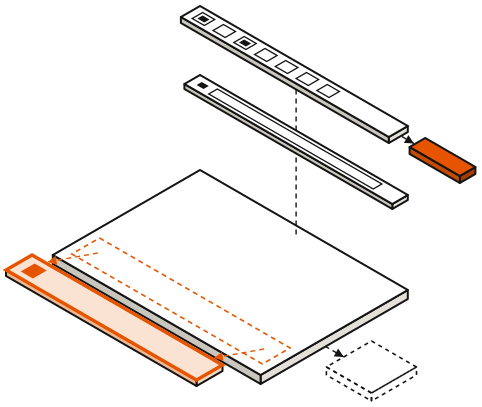
Canva's free tier publishes up to 5 websites on the my.canva.site domain, each wearing a mandatory "Designed with Canva" footer. The limit with real teeth is the section cap: per Canva's help documentation, free users can design up to 20 sections on a page but publish only 10 — the editor lets you build a page twice as long as the publish button will accept, and delivers the news at the publish step, when deleting half your site and upgrading are presented as equally convenient options. Paid plans publish the full 20.
Each slab is one section. Solid: published. Dashed: designed in the editor, held back on the free plan.
The structural ceiling sits above the caps: multi-page support reaches 45 pages, but navigation is anchor-link based — jumps within a page, not architecture between pages — and there is no blog engine, no commerce and no native forms on any tier. Connecting a domain you already own requires a paid plan. The full inspection is in our Canva Websites review.
Affiliate link. We may earn a commission — it never moves a ranking.
Square Online: the limit is a percentage
Square inverts the pattern: the free store is functionally unlimited — unlimited products, real checkout, pickup and shipping — and the wall is printed on every receipt instead. The free plan pays 3.3% + 30¢ per online transaction, a rate quietly raised from 2.9% + 30¢ on January 13, 2026, and 0.4 percentage points above what paid-plan sellers pay. On a $5 order that works out to an effective 9.3%.
The secondary tolls are the usual pair — a yourname.square.site subdomain and "Powered by Square" branding until you pay — and the exit price moved in the wrong direction: since the October 6, 2025 plan consolidation, the cheapest paid tier is Square Plus at $49 per month per location, replacing a legacy flat $29-per-month plan that did not multiply by location count. Fee arithmetic and break-even math are worked through in our Square Online review.
Affiliate link. We may earn a commission — it never moves a ranking.
Adobe Express: free to publish, impossible to own
Adobe Express gates almost nothing: webpage creation and publishing work on the free plan, and Premium at $9.99 per month buys assets, AI credits and storage — not web features. The wall here is not a plan gate at all. Published pages live only at express.adobe.com addresses, and on the question of moving them, Adobe staff answered plainly in the company's own forums in 2025:
"the custom domain name feature isn't available in Adobe Express" — Adobe staff, Adobe Community forums, March 2025
No custom domains, no export, and a community bug board carrying recurring threads from 2024 through 2026 about webpages disappearing from accounts with no version history to recover. A page you cannot address and cannot retrieve is a share-link, not a web presence — the complete argument is in our Adobe Express review.
Power Pages: the free tier is 30 days long
Microsoft Power Pages belongs in this catalogue as the control group: the product with no free tier at all beyond a 30-day trial, whose limits are therefore printed in dollars per capacity pack. Microsoft's published rates: $200 per month per 100 authenticated users per website, or $75 per month per 500 anonymous users per website, both paid yearly; pay-as-you-go runs $4 per authenticated user and $0.30 per anonymous user, metered on unique visitors per calendar month.
Read the unit carefully: capacity is licensed per website, so a second site doubles the bill, and anonymous visitors are a metered resource — a modest 5,000-visitor month on a brochure site prices out around $750 at list rates. Power Pages is the one builder on this list that charges you for being visited, which makes success on the open web a licensing event. Why it is built this way, and who it is actually for, is covered in our Power Pages explainer.
How to check the limits before you commit
The pattern across all five products is consistent: the marketing page sells the ceiling-free version, and the help center holds the blueprints. A pre-commitment inspection takes about twenty minutes:
- Search the vendor's help center — not its homepage — for "limits," "quota," and "fees." The section caps and mapping caps in this catalogue all live in help articles.
- Find the fine print attached to the publish step. Canva's design-20/publish-10 trap is invisible until the moment of publishing; better to meet it in the documentation.
- Price a transaction and a visitor, not a month. Square's wall is per sale; Power Pages' wall is per unique visitor. A $0 monthly fee tells you nothing about either.
- Check the exit before the entrance: is there an export? Can you take a domain with you? Google Sites and Adobe Express both answer no, and the business.site shutdown is the recorded consequence of not asking.
- Read the changelog cadence. Google Sites tagged two feature announcements in 2025 and none so far in 2026; a quiet changelog is a vendor telling you, politely, where the product sits on its org chart.
None of this argues against using the free tiers — used inside their documented walls, several of them are excellent, and the register ranks them for exactly that. It argues for reading the walls first, and for knowing the graduation paths for when you've outgrown them before the day you need one.
Frequently asked questions
Q.01Are free big-tech website builders actually free?
Three of the five have genuine free tiers: Google Sites has no paid version at all, Canva publishes up to 5 sites free, and Adobe Express publishes webpages on its free plan. Square Online is free monthly but charges 3.3% + 30¢ per online sale, and Power Pages has no free production tier — only a 30-day trial. Every free tier carries documented limits on domains, sections, branding or capacity.
Q.02Which free big-tech builder has the fewest limits?
It depends on which limit hurts you. Google Sites is the least restricted on cost — free forever, free custom domain connection — but has no commerce and no export. Square Online is the least restricted on capability, with unlimited products and real checkout, but takes a percentage of every sale. Canva and Adobe Express cap structure: sections and sites on Canva, and no custom domain at all on Adobe Express.
Q.03Can I use my own domain on these free plans?
Only on Google Sites, which connects custom domains free with a cap of 5 per site and 20 mappings per week. Canva requires a paid plan to connect a domain you already own, Square Online requires a paid plan for custom domains, Adobe Express does not support custom domains on any plan, and Power Pages has no free plan to attach one to.
Q.04What is the biggest hidden risk with free big-tech builders?
Discontinuation combined with lock-in. Google's business.site websites were shut down in March 2024 with redirects ending that June, and products like Google Sites and Adobe Express offer no export, so a shutdown means rebuilding from scratch. The practical insurance is owning your domain, keeping copies of your content, and checking a product's export options before committing to it.
Position in the field: the big-tech website builders register. Outgrowing these products entirely is covered in when you’ve outgrown them.